
Handoff Construction Estimator
HandoffBusiness
4.7141.00 Reviews
- Version
- 2.19.10
- Installs
- 10.00K
- Age Rating
- Everyone
Screenshots



Our Review of Handoff Construction Estimator
 Analysis by Appyee
Before I trust any estimating app with a real job, I want to know where it fits in my workflow and what I can personally check before entering project details. Construction estimates can expose sensitive information about a customer’s home, budget, and planned work, so convenience alone is not enough. Handoff Construction Estimator is a business app from Handoff that uses AI to support contractors with estimating; I see its clearest value as a way to organize an early cost conversation, not as a substitute for professional judgment or a final site assessment.
Trust starts with the estimate, not the sales pitch
The practical question is whether an estimate is useful enough to inform a decision while remaining easy for me to review. I would treat any AI-assisted result as a draft: check the assumptions, compare the quantities with the actual scope, and adjust local prices before sharing a number with a customer. A polished total can look authoritative even when a room, finish choice, access issue, or hidden condition has not been accounted for.
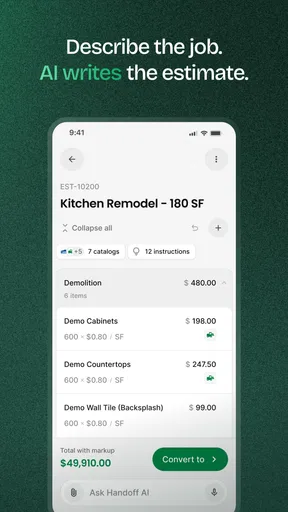
That distinction matters most in remodeling, where a short description rarely captures every cost driver. A kitchen refresh, for example, may sound straightforward until I consider demolition, disposal, plumbing changes, finish selections, and the condition behind existing surfaces. My useful workflow would be to define the scope first, use the app to assemble an initial estimate, then walk through each line with the customer. The app can help structure that conversation; it cannot inspect the property or decide what the customer actually wants.
What I can verify before sharing project details
I look for concrete controls before putting customer information into any business tool: what permissions the app requests, what account settings are available, and whether I can review or remove stored information. I would check those choices directly on my device and in the app before using it for a client project. I do not assume that an AI feature needs broad access to a phone simply because it is convenient, and I would grant only the access that a task clearly requires.
The app is free to download, carries an Everyone age rating, and has optional in-app purchases priced at $149.99 per item. That makes it sensible to explore the basic experience before committing to a paid option. I would inspect the purchase screen carefully, confirm what an item includes, and make sure I understand whether it suits the way I estimate. A free starting point is useful, but it does not by itself tell me whether a paid choice will fit a small contractor’s budget or workload.
Keep sensitive moments deliberate
Estimates can reveal more than a project total. Names, addresses, room details, material preferences, and a customer’s spending limits may all be sensitive in context. I would avoid entering details that are not needed to form the estimate, especially when I am only testing the app or comparing a rough scenario. For an initial trial, a generic project description and approximate figures are a safer way to learn the workflow than a real customer’s full address and personal circumstances.
I would also separate a working estimate from a promise. Before sending a number, I’d check that it reflects the latest scope and local rates, and explain which parts could change after a site visit or a selection decision. That simple step protects the customer relationship as much as it protects the contractor: it makes clear that the figure is a planning aid rather than a guaranteed fixed price. If a project involves unusual structural work or significant unknowns, I would rely on direct inspection and specialist input instead of treating an app-generated calculation as decisive.
How I would decide whether it belongs in my toolkit
With a 4.6 average from around 442 ratings, Handoff has attracted a positive response from users, while its 10K-plus installs suggest it has found an audience among contractors. Those figures are helpful context, but they are not a substitute for checking whether the app matches my own estimating habits. It was released on July 3, 2024, and version 2.17.4 is the current version; I would keep the app updated and review its permissions and purchase choices as part of ordinary account housekeeping.
I would start with a low-risk test: create a sample renovation estimate, vary one material price, and see whether the resulting breakdown is understandable enough to explain to a customer. Then I’d compare it with my usual spreadsheet or estimating template. If the app gets me to a clear draft faster without hiding assumptions, it earns a place in my workflow. If I spend more time checking or correcting the output than I save, my existing method may be the better tool for that job.
First Impressions
Right off the bat, the Handoff Construction Estimator boasts a clean and intuitive interface. You don’t need to be a tech wizard to navigate through it, which is a huge plus in my book. The app opens up to a dashboard that gives you quick access to all its nifty features. It’s like having a personal assistant who knows the ins and outs of construction costs.
Features Galore
So, what does this app actually do? A lot, as it turns out. The app allows you to create detailed cost estimates for any construction project. Whether you’re working on a small renovation or a massive building, it’s got you covered. You can input materials, labor, and other expenses, and the app does the math for you. It’s like having a calculator on steroids.
One feature that really stands out is the ability to customize your estimates. You can adjust prices based on local rates, which is super handy. Plus, it keeps a log of all your past projects, so you can easily refer back to them. It’s like having a digital filing cabinet in your pocket.
Ease of Use
Let’s talk about usability. The app is designed to be user-friendly, which is crucial for those of us who might not be the most tech-savvy. The instructions are clear, and everything is laid out logically. I didn’t find myself lost or confused at any point, which is a huge relief. You’re not going to need a manual to figure this one out.
Real-World Application
In practice, the Handoff Construction Estimator is a real time-saver. I took it for a spin on a recent project and was impressed by how quickly I could put together an estimate. It’s particularly useful for those last-minute projects where you need to get a handle on costs ASAP. I found myself relying on it for quick checks and balances, ensuring I wasn’t missing anything crucial.
One thing I noticed is that it helps streamline communication. When everyone is on the same page with costs, it makes for a much smoother project. It’s like having a universal translator for construction costs.
Who benefits most from a quicker first draft
I think the strongest fit is a contractor who regularly needs to turn an initial conversation into a structured cost outline: a remodeler juggling several inquiries, a small crew preparing to discuss options, or an independent tradesperson who wants a convenient way to check material and labor totals. A first estimate can help a customer understand whether a project is in the right ballpark before both sides invest time in detailed planning.
It is less compelling for someone whose work depends on highly specialized takeoffs, strict bid formats, or complex commercial procurement. Those users may need estimating software built around their particular trade, document standards, and approval process. A spreadsheet can also be the better choice when the estimate has unusual formulas or must match a company’s established template. I would use Handoff where flexibility and speed matter, not assume it replaces every tool a contractor already relies on.
A realistic day-to-day workflow
Imagine a contractor finishing a site visit and receiving a message from a homeowner who wants a bathroom refreshed. Rather than sending a hurried number from memory, I’d note the agreed scope, separate labor from materials and other expenses, and build a preliminary estimate. I’d then adjust the relevant prices to reflect local conditions, review the total, and flag choices—such as fixtures or finishes—that could move the budget. The customer gets a more useful starting point, while the contractor keeps the conversation anchored to a defined scope.
The time-saving benefit is not only arithmetic. Reusing past project records can give me a reference when a new job resembles earlier work, but I would treat those records as comparisons rather than automatic templates. A similar-looking renovation may have different access, material availability, or existing conditions. Before copying a previous figure, I’d check what changed and update the assumptions; otherwise, a convenient starting point can quietly carry an outdated price into a new quote.
Making the estimate easier to trust
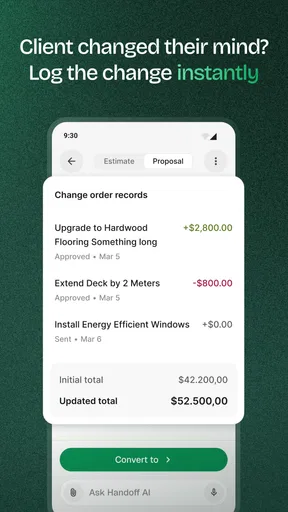
One practical habit is to build estimates in stages. I’d first capture the work the customer has actually requested, then add costs that are easy to overlook, and finally review the result against the site notes. This is a better use of an estimator than entering a vague project label and accepting a single headline figure. It also makes revisions easier: when a customer changes a finish or removes a task, I can revisit the affected part instead of treating the whole estimate as an unexplained total.
Another useful check is to compare the app’s result with a familiar calculation on a small sample job. I would test a straightforward room or repair, confirm that the labor and material inputs produce a sensible total, and then try a change in local pricing. This does not prove every future estimate will be right, but it helps me understand how I need to review its output. For a contractor training an assistant to prepare drafts, that repeatable checking routine can be more valuable than speed alone.
Where the convenience has limits
AI can make a first pass feel quick, but construction costs depend on details that may be hard to capture in a brief entry. Quantities, waste, delivery, site access, permit requirements, and concealed damage can all affect a job, and the contractor remains responsible for deciding what belongs in the quote. I would not send an estimate without checking that the scope is complete and that the figures still reflect current supplier and labor conditions.
There is also a trade-off between a fast mobile workflow and the careful review that a larger bid deserves. If I am preparing a complex project with multiple subcontractors, extensive drawings, or contractual requirements, I would use the dedicated estimating and document process that job demands, then treat a quick app estimate only as an early reference if useful. The right tool is the one that makes the actual bid more accurate and understandable, not simply the one that produces a number first.
Controls are part of ordinary job preparation
Before relying on any app for ongoing client work, I would make a small account-and-device check part of setup: review requested permissions, make sure I know which account is active, and look for the available ways to manage information and purchases. I’d also avoid leaving a device unlocked where customer project details are visible. These are ordinary precautions, not a claim about any particular privacy practice; they help me keep control of information regardless of which estimating method I use.
For a team, I would agree on who prepares estimates and how drafts are reviewed before they reach customers. A shared understanding of naming conventions, price updates, and approval responsibility can prevent two people from treating different versions as final. If the app’s available controls do not match a company’s required account or record-management process, that is a good reason to keep customer work in the company’s approved system instead.
Final Thoughts
All in all, the Handoff Construction Estimator is a solid tool for anyone in the construction industry. It’s practical, easy to use, and packed with features that make estimating costs a breeze. Whether you’re a seasoned pro or a newbie, this app is worth checking out. It might just become your new best friend on the job site.
So, if you find yourself knee-deep in construction plans and need a little help sorting out the numbers, give Handoff Construction Estimator a try. It could be the helping hand you’ve been looking for!
Verdict
Strengths of Handoff Construction Estimator
- Intuitive interface for quick estimates.
- Supports a wide range of construction tasks.
- Cloud sync for easy data access.
- Customizable templates for projects.
- Real-time cost updates and adjustments.
Limitations of Handoff Construction Estimator
- Limited offline functionality.
- Some features require premium access.
- Initial setup can be time-consuming.
- Occasional syncing delays.
- Limited integration with other software.
Similar Picks in This Category
View All
LinkedIn: Community & Network
LinkedIn3.8

Zoom Workplace
zoom.com4.1

Microsoft Teams
Microsoft Corporation4.6

Meta Business Suite
Meta Platforms, Inc.4.6

Webex Meetings
Cisco Systems, Inc.4.5

TeamViewer Remote Control
TeamViewer4.4
Frequently Asked Questions
What is Handoff Construction Estimator used for?
Handoff Construction Estimator is designed to assist contractors and construction professionals in accurately estimating project costs. It simplifies the process by providing tools for calculating materials, labor, and other expenses, making it easier to manage budgets and timelines effectively. This app is particularly useful for those looking to streamline project planning and financial management.
Is Handoff Construction Estimator user-friendly for beginners?
Yes, Handoff Construction Estimator is designed with an intuitive interface that is accessible to both seasoned professionals and beginners. The app includes tutorials and customer support to help new users navigate its features and functionalities, ensuring that even those with minimal experience can quickly become proficient in using it.
Can I customize the estimates within the app?
Absolutely. Handoff Construction Estimator allows users to customize estimates to fit specific project needs. You can adjust variables such as material costs, labor rates, and project timelines. This flexibility ensures that the estimates generated are tailored to the unique requirements and conditions of each individual project, improving accuracy.
Does the app support multiple projects simultaneously?
Yes, Handoff Construction Estimator supports the management of multiple projects at once. This feature is particularly useful for contractors handling several jobs concurrently, allowing them to switch between projects seamlessly and keep track of all necessary details without confusion or error.
Is there a subscription fee for Handoff Construction Estimator?
Handoff Construction Estimator offers both a free version and a premium version with additional features. While the free version provides basic functionalities, subscribing to the premium plan unlocks advanced tools and capabilities, enhancing the overall estimating and project management experience. Pricing details can be found on the app's official website or download page.
